


Volvo Truck Fault Codes Reading
Mochester App Fault Codes Read solutions for:
How to get
1. Select a Service
Check available tuning solutions in the Mochester App for your truck.
2. Pay for Your Order
Top up your wallet on https://dl.ge/ for the amount of the chosen solutions.
3. Get Your Solution
Return to the Mochester App and get the solutions.




15+ Years of Experience
Professional ECU programming for commercial vehicles since 2009.

Official DrunkLab Software
Original engineering solutions developed by the DrunkLab team.

Fast Turnaround
Most tuning sessions are completed in 25 minutes or less.

Compatibility Table
Model | Type | Year | Adapter | Link |
|---|---|---|---|---|
D11 EPA10/US10 | Truck | 2010-2013 | RP 1210 | |
D13 EPA10/US10 | Truck | 2010-2013 | RP 1210 | |
D16 EPA10/US10 | Truck | 2010-2013 | RP 1210 | |
D11 EPA14/US14 | Truck | 2014-2017 | RP 1210 | |
D11 EPA14/US14 | Truck | 2014-2017 | RP 1210 | |
D13 EPA14/US14 | Truck | 2014-2017 | RP 1210 | |
D13 EPA14/US14 | Truck | 2014-2017 | RP 1210 | |
D16 EPA14/US14 | Truck | 2014-2017 | RP 1210 | |
D16 EPA14/US14 | Truck | 2014-2017 | RP 1210 | |
D11 EPA17/US17 | Truck | 2017-PT | RP 1210 | |
D13 EPA17/US17 | Truck | 2017-PT | RP 1210 | |
D16 EPA17/US17 | Truck | 2017-PT | RP 1210 |
How to use the Mochester App
Download
Install and launch the Mochester App. Sign in using your dl.ge account and click Login.
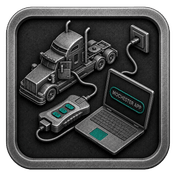
Connect
Tap Start Connecting, follow the on-screen steps, and wait while your vehicle is identified. Click Next to load available tuning solutions.
Top-Up
On dl.ge, open Wallet, select WALLET TOP-UP, enter the required amount, complete the payment, then return to the Mochester App.
Proceed to tuning
Select one or more tuning solutions, click Next, confirm with your one-time password, and wait while the download completes and flashing starts automatically.
Processing
Wait until flashing is complete while monitoring the progress bar. A detailed report will be generated, and your selected features will be ready to use.

How can I read Volvo truck fault codes with the Mochester App (M4 App)?
The Mochester App (M4 App) grants access for Volvo trucks’ owners and technicians to read Diagnostic Trouble Codes (DTCs). The App provides means of diagnosing faults for issues relating to Transmission, Engine, Emissions, and even Sensors and Modules. The App provides faster/more efficient troubleshooting.
Reading Fault Codes for Volvo Trucks involves identifying and troubleshooting problems in Volvo trucks’ systems. This procedure empowers automotive technicians and drivers to identify and analyze errors and malfunctions that may occur in various components and systems of Volvo trucks.
About Mochester App (M4 App)
Using our specialized software, the Mochester App (M4 App), you can conveniently read the error codes saved in the electronic memory of control units in Volvo trucks- free of charge! This application simplifies problem identification to speed up the troubleshooting process for resuming normal operations on Volvo trucks.
Advantages and Disadvantages of Volvo Truck Fault Codes Reading
Advantages of Using Mochester App (M4 App):
- Fast recognition of problems leads to faster preventative maintenance.
- Mochester App provides free error codes so that we can reduce the cost involved in diagnostics.
- Malfunctions in the Volvo truck can be fixed to improve safety and reliability.
Disadvantages of not Using Mochester App (M4 App):
- Using certain programs and tools for reading fault codes.
- Reading and interpreting error codes can be challenging for many.
Conclusion
Reading fault codes is one way to keep your Volvo truck in top shape. The Mochester App is an example of a great diagnostic tool to help get problems solved faster. This contributes to the safety and efficiency of Volvo trucks.
FAQ
How to tune the Volvo Truck via the Mochester App (M4 App)?
What are truck DTC (Diagnostic Trouble Codes)?
Truck Diagnostic Trouble Codes are generalized codes which are put in place to report and troubleshoot for problems in truck systems. They were designed to help identify problems that need to be fixed.
Can Mochester App (M4 App) read fault codes of all Volvo truck models?
Yes, M4 App can read fault codes of most Volvo truck models, providing a convenient solution for diagnosing issues in Volvo trucks. M4 App is capable of reading fault codes of the majority of Volvo truck models, saving a lot of time to diagnose problems in Volvo trucks.
What are the common causes of fault codes in Volvo trucks?
Common causes of fault codes in Volvo trucks include sensor malfunctions, electrical issues, engine problems, and component failures.
Can fault code reading help prevent expensive repairs?
Absolutely. Being able to read fault codes helps your mechanics catch problems as they start developing and before they can cause major failures of large, expensive components, or cause the vehicle to be inoperable for a prolonged period of time.
Which systems can generate fault codes in a Volvo truck?
Fault codes can originate from various systems, including the engine, transmission, ABS, EBS, emissions systems, sensors, electrical components, and communication networks between control modules.
Do fault codes always indicate a serious problem?
No. Some fault codes mean that there is a minor problem, or maybe a problem that was only temporary. There are, however, fault codes that mean that there is a serious problem that needs to be addressed. It is important that there is a proper diagnosis.